
Reports and dashboards
The reports finance and auditors ask for, ready when they ask
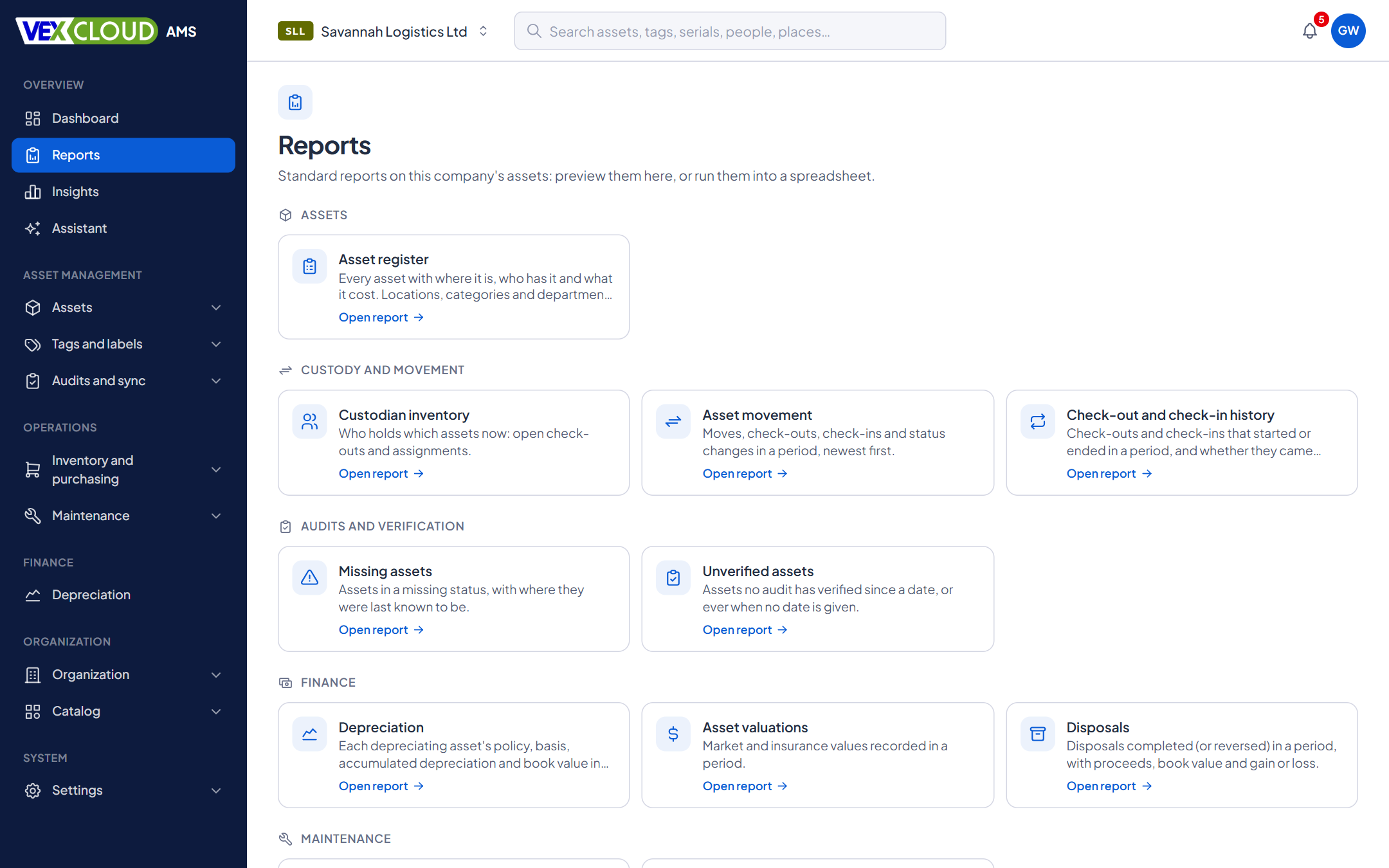
Run a report for the active company, preview it on screen, and export it. Dashboards show where things stand today, arranged for the role looking at them.
The problem
Every request from the finance team or the auditors becomes an afternoon of filters, copy and paste, and a spreadsheet nobody can reproduce a month later.
How it works in VexCloud AMS
01
A catalogue of standard reports
Each report has a preview and a run. Filter by location, category, department, status or date range where the report allows it, check the preview, then run it into a spreadsheet or a PDF.
02
Dashboards for the role
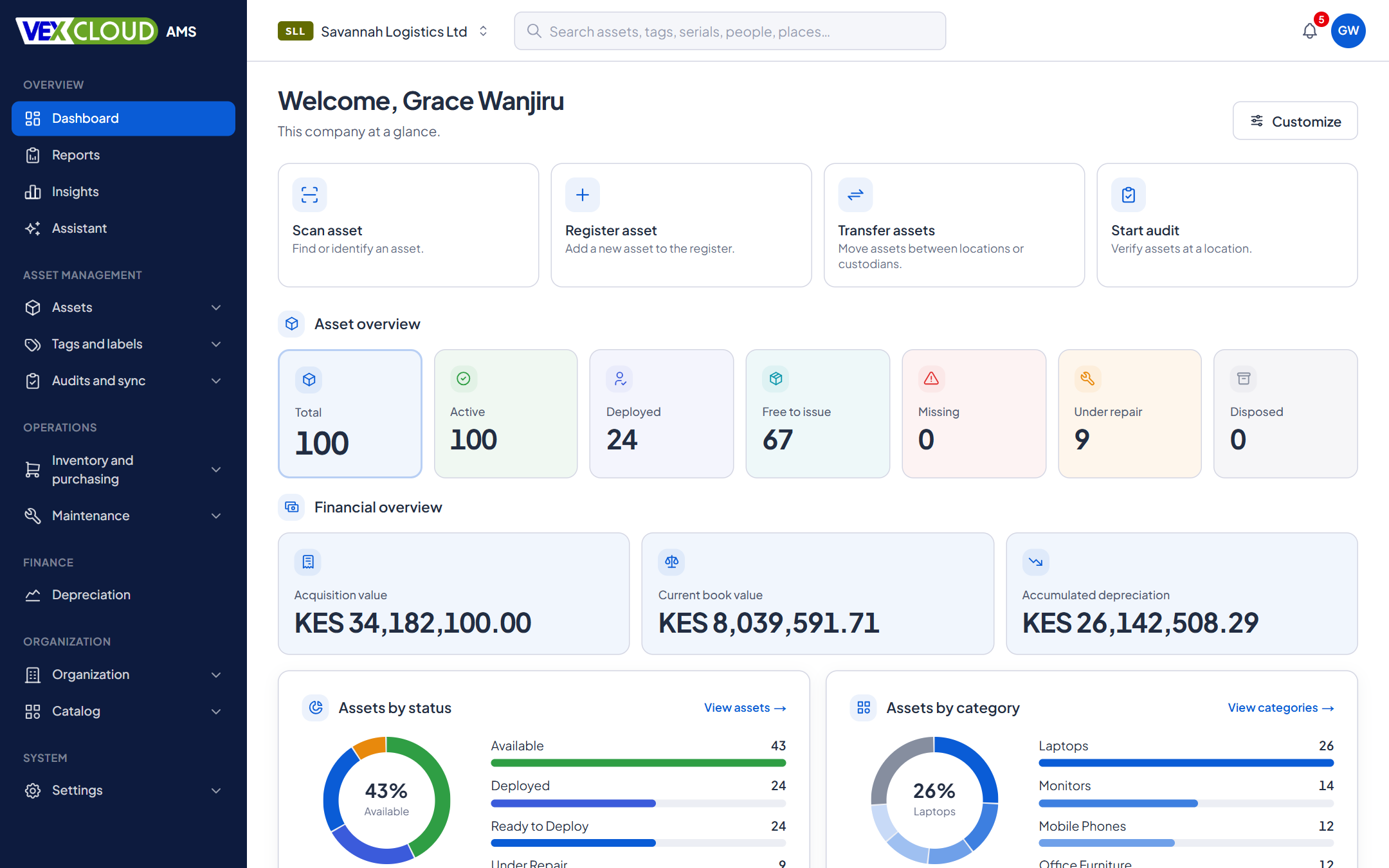
The dashboard answers the questions in turn: quick actions, asset overview, financial overview, distributions by status and category, recent activity, what needs attention, and what is coming up in audits, warranties and maintenance. Layouts can differ by role, and each person can arrange their own.
The charts are drawn from real counts, and the figures are always there as text too.
03
Search, filter, save
Search across asset numbers, tags, serial numbers, people and places from one box. Advanced filters narrow the register, and a combination of filters, columns, sorting and grouping can be saved as a view and shared with a team. Exports use the same filters, so what you export is what you saw.
04
On a schedule, on the record
Schedule a report and it runs on its own. Every run, and every export of a list, is written to the audit log with who asked and how many rows, so a copy of the register leaving the system is never invisible.
The report catalogue
Assets
- Asset register
- Location inventory
- Category inventory
Custody and movement
- Custodian inventory
- Asset movement
- Check-out and check-in history
Audits and verification
- Missing assets
- Unverified assets
Finance
- Depreciation
- Asset valuations
- Disposals
Maintenance
- Work orders
- Warranties
Inventory and licenses
- Software licenses
- Accessories
- Consumables
Compliance
- Audit trail
Details
- Standard reports
- Assets, custody and movement, audits, finance, maintenance, licenses and stock, audit trail
- Output
- CSV, Excel, PDF
- Scheduling
- Reports run on a schedule
- Financial columns
- Hidden from people without permission to view financials
- Dashboards
- Widgets by role, personal layouts
- Saved views
- Filters, columns, sorting and grouping, shareable
- Exports
- The list exports with its filters and columns
- Safety
- Cells that could run as formulas are neutralised in CSV
- Audit
- Every run and export is logged
- Company
- Always the active company
Related features
- DepreciationPolicies by company, category, model or asset, with a ledger you can reproduce.
- Physical asset auditsScan what is really there and reconcile it against the register while you count.
- Fixed asset registerNumbers, serials, locations, custodians, values, photos and documents, with history.
Banks and SACCOs: branch-by-branch registers and verification on schedule.
A report is only as good as the tags behind it. See Vexar's asset tags buyer's guide.
FAQ
Questions on reports and dashboards
What formats can I export to?
Reports run into CSV and Excel, and the standard reports can also be produced as PDF. The asset list exports with its current filters and columns.
Can reports go out on a schedule?
Yes. A report can be scheduled, and it runs without anyone opening it.
Who can see financial figures?
Cost, book value and currency columns are marked as financial and shown only to people with permission to view financials.
Do reports cover all my companies?
Each report is run for one company, the active one, so figures never mix clients. The All companies view is read-only and for administrators.
Is every export recorded?
Yes. Who ran which report, with which parameters and how many rows, is written to the audit log.
See your own assets in VexCloud AMS.
Book a 30-minute demo.